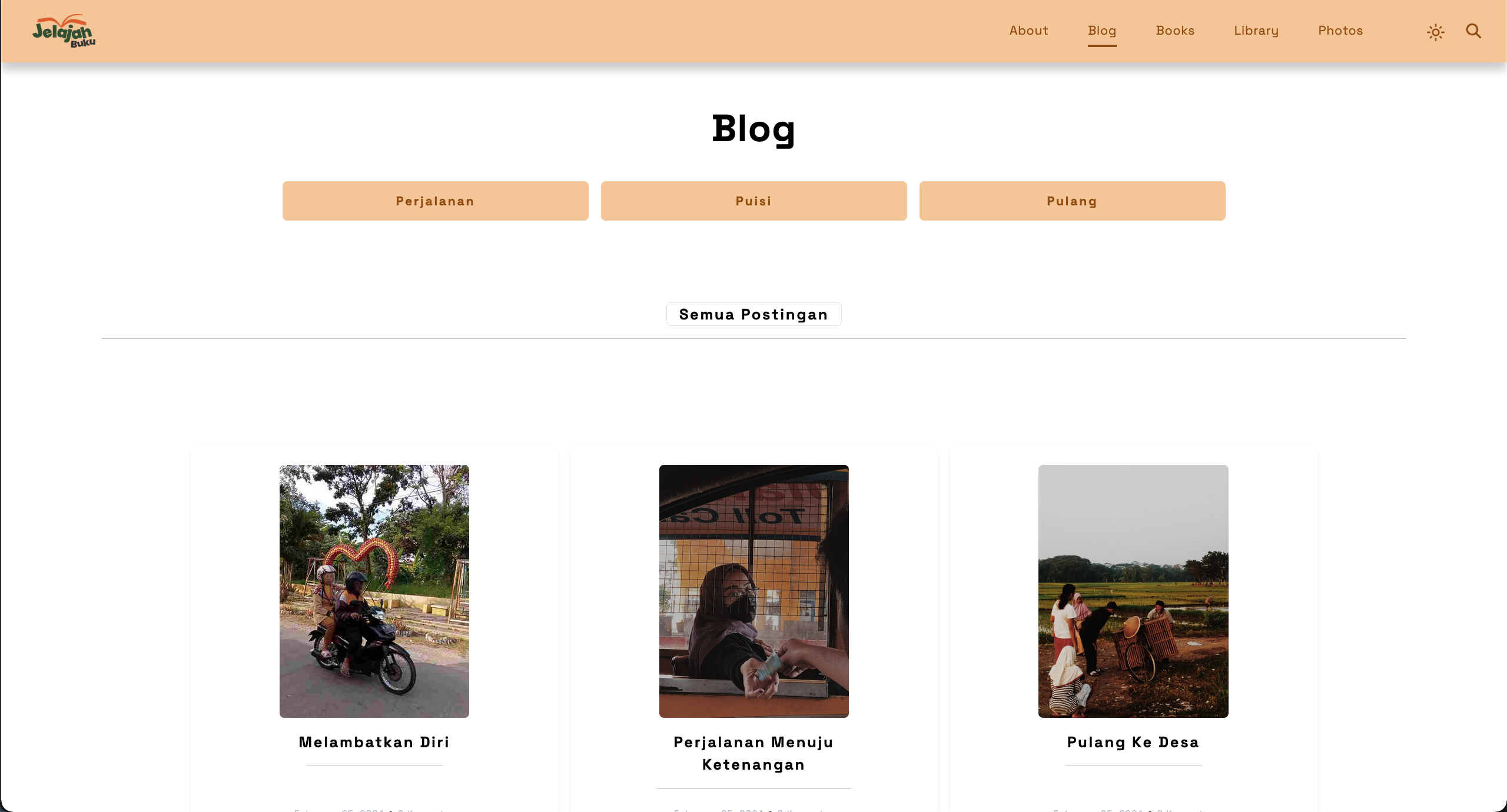
📝 Personal Blog - Modern Content Management System
A full-featured blog platform built with Laravel framework and Livewire for reactive components. This application provides a complete content management system with advanced features including rich text editing with CKEditor 5, guest commenting system, password recovery via email, and comprehensive admin dashboard for managing posts, categories, tags, and site settings.
🎯 Overview
Personal Blog is a modern web application that combines powerful content management capabilities with an intuitive user interface. Built using Laravel 10 and Livewire 3, the system enables content creators to publish and manage blog posts efficiently while providing readers with a seamless browsing and commenting experience. The platform supports rich media content, categorization, tagging, and includes security features like email verification for password recovery.
✨ Key Features
📖 Reader Features
1. Blog Content Browsing
- Homepage Display: Latest blog posts with featured content
- Post Categories: Browse posts organized by categories
- Tag-Based Navigation: Filter posts by tags
- Search Functionality: Find posts by keywords
- Responsive Layout: Mobile-friendly reading experience
- Rich Media Content: Images, videos, and formatted text
2. Post Viewing
- Full Post Display: Complete articles with rich formatting
- Category and Tag Labels: Easy topic identification
- Publication Date: Post timestamp information
- Author Information: Blog author details
- Related Posts: Discover similar content
- Image Gallery: Embedded images and media
3. Guest Comment System
- No Registration Required: Comment without creating an account
- Identity Storage: User information saved via cookies and database
- Comment Display: View all comments on posts
- User-Friendly Form: Easy comment submission
- Persistent Identity: Automatic form filling for returning visitors
4. About Page
- Blog Information: Learn about the blog and author
- Contact Details: Ways to reach the blog owner
- Social Media Links: Connect on various platforms
- Address Information: Location details (if applicable)
🔐 Admin Features
1. Admin Dashboard
- Statistics Overview: Key metrics at a glance
- Total posts count
- Total categories count
- Total comments count
- Recent activity
- Quick Actions: Fast access to main functions
- Content Summary: Recent posts and comments
2. Post Management (CRUD)
- Create Posts:
- Title and content editor (CKEditor 5)
- Rich text formatting (bold, italic, lists, etc.)
- Image upload and embedding
- Category selection
- Multiple tag assignment
- Publish/Draft status
- SEO-friendly URL slug
- Edit Posts: Update content, categories, and tags
- Delete Posts: Remove posts with cascade deletion
- Post List: Paginated posts with search and filter
- Preview Mode: View posts before publishing
3. Category Management
- Create Categories:
- Category name and description
- SEO-friendly slug
- Category color/theme
- Edit Categories: Update category information
- Delete Categories: Remove categories (with validation)
- Category Organization: Hierarchical structure support
- Post Count: See number of posts per category
4. Tag Management
- Create Tags: Quick tag creation
- Tag Assignment: Add multiple tags to posts
- Edit Tags: Update tag names and descriptions
- Delete Tags: Remove unused tags
- Tag Cloud: Visual representation of popular tags
- Tag Filtering: Filter posts by selected tags
5. Comment Management
- View Comments: All comments across all posts
- Moderate Comments: Approve or reject comments
- Delete Comments: Remove inappropriate comments
- Comment Analytics: Track engagement metrics
- User Information: See commenter details
6. Application Settings
- Site Configuration:
- Blog name and tagline
- Logo upload and management
- Favicon settings
- Contact information
- Email configuration
- Display Settings: Customize site appearance
- Social Media Links: Add and manage social profiles
- Address Management: Store location information
7. About Page Management
- Content Editor: Update about page content
- Rich Text Formatting: CKEditor support
- Image Gallery: Add images to about page
- Contact Form: Manage contact information
- SEO Settings: Meta descriptions and keywords
8. Authentication System
- Admin Login: Secure username/password authentication
- Session Management: Persistent login sessions
- Role-Based Access: Admin and guest roles
- Logout Function: Secure session termination
- Cookie Management: Secure cookie handling
9. Password Recovery System
- Forgot Password: Email-based recovery
- Email Verification: SMTP protocol for sending verification codes
- Active Email Validation: Ensure email is valid and active
- Verification Code: Secure code generation
- Password Reset: Create new password after verification
- Security Measures: Time-limited verification codes
🛠️ Technical Features
1. Laravel Framework
- MVC Architecture: Clean code organization
- Eloquent ORM: Powerful database interactions
- Blade Templates: Dynamic view rendering
- Route Management: RESTful routing
- Middleware: Request filtering and authentication
- Form Validation: Built-in validation rules
2. Livewire Integration
- Reactive Components: Real-time UI updates without page reload
- Component-Based: Reusable UI components
- Wire Loading: Loading states for better UX
- Wire Model: Two-way data binding
- Event Broadcasting: Component communication
- File Upload: Livewire file upload handling
3. CKEditor 5 Integration
- Rich Text Editor: Full-featured WYSIWYG editor
- Image Upload: Direct image upload from editor
- Content Formatting: Text styling and formatting
- Media Embedding: Videos and embedded content
- Custom Toolbar: Tailored editing tools
- Auto-Save: Draft auto-saving functionality
4. Email System
- SMTP Integration: Email sending via SMTP protocol
- Verification Emails: Automated verification code delivery
- Email Templates: Professional email layouts
- Mail Queue: Asynchronous email sending
- Error Handling: Robust email delivery management
5. Security Features
- CSRF Protection: Cross-Site Request Forgery prevention
- SQL Injection Prevention: Prepared statements and ORM
- XSS Protection: Input sanitization and output escaping
- Password Hashing: Bcrypt password encryption
- Email Verification: Secure password recovery
- Session Security: Secure session management
6. Cookie Management
- Guest Identity Storage: Remember guest commenters
- Secure Cookies: HttpOnly and Secure flags
- Auto-Fill Forms: Pre-fill commenter information
- Persistent Data: Long-term identity storage
- Privacy Compliant: GDPR-friendly cookie usage
🏗️ System Architecture
Backend Architecture (Laravel 10)
MVC Pattern Implementation
Models:
- Post: Blog post management
- Category: Category organization
- Tag: Tagging system
- Comment: User comments
- User: Admin authentication
- ApplicationSettings: Site configuration
- SocialMedia: Social media links
- Address: Location information
- Menu: Navigation management
- Media: File and image storage
- Note: Additional content storage

Livewire Components:
- MainPage: Homepage display
- SecondPage: Category listing
- ThirdPage: Individual post view
- ContentPage: Post content display
- SearchPage: Search functionality
- AboutPage: About page display
- NavbarComponent: Navigation menu
- FooterComponent: Footer display
- AdminHome: Admin dashboard
- AdminPost: Post management
- AdminSetting: Site settings
- AdminAbout: About page management
- AdminNavbar: Admin navigation
- Login: Authentication
- ForgotPassword: Password recovery
Database Structure
- Comprehensive relational database design
- Normalized data organization
- Efficient relationships between entities
- Support for multiple categories and tags per post
- Guest user information storage
- Application settings management
Frontend Architecture
Livewire Components
- Reactive UI: Real-time updates without full page reload
- Component Reusability: Shared components across pages
- State Management: Livewire properties for data handling
- Event Handling: User interaction management
Template System
Views Structure:
- app/: Public-facing pages
  - Main page (homepage)
  - Category pages
  - Individual post view
  - About page
  - Search results
  - Forgot password

- dashboards/admin/: Admin interface
  - Dashboard overview
  - Post management
  - Settings management
  - About page editor

- components/: Reusable components
  - Navigation bar
  - Footer
  - Admin navigation
Technology Stack
Backend
- PHP 8.2: Modern PHP features and performance
- Laravel 10: Latest Laravel framework
- Livewire 3: Reactive component library
- Eloquent ORM: Database abstraction layer
- MySQL/MariaDB: Relational database
Frontend
- Bootstrap 5: Responsive CSS framework
- CKEditor 5: Rich text editor
- JavaScript ES6+: Modern JavaScript
- Blade Templates: Laravel templating engine
- Alpine.js: Lightweight JavaScript framework (via Livewire)
Development Tools
- Composer: PHP dependency management
- NPM: JavaScript package management
- Vite: Frontend build tool
- Docker: Containerization support
- PHPUnit: Testing framework
- Laravel Pint: Code style fixer
📊 User Flow & Workflow
1️⃣ Reader Journey
1. Visitor lands on homepage
2. Browse featured posts and categories
3. Click on post to read full content
4. Scroll through rich text content with images
5. Read existing comments
6. (Optional) Leave a comment:
   - Enter name, email, and comment
   - Submit comment
   - Identity saved for future visits
7. Explore related posts or categories
8. Use search to find specific topics
2️⃣ Admin Workflow - Creating Post
1. Login to admin dashboard
2. Navigate to Posts section
3. Click "Create New Post"
4. Enter post details:
   - Write title
   - Use CKEditor for content
   - Upload and embed images
   - Select category
   - Add tags
   - Set publish status
5. Preview post
6. Publish or save as draft
7. Post appears on public site
3️⃣ Admin Workflow - Managing Categories
1. Navigate to Categories section
2. View all existing categories
3. Create new category:
   - Enter category name
   - Add description
   - Generate slug
4. Edit existing categories
5. Delete unused categories
6. Categories available for post assignment
4️⃣ Password Recovery Flow
1. User clicks "Forgot Password"
2. Enter registered email address
3. System sends verification code via email
4. User checks email inbox
5. Enter verification code
6. Code validated by system
7. Enter new password
8. Password successfully reset
9. Login with new credentials
🔐 Security Features
Authentication & Authorization
- Laravel Authentication: Built-in auth system
- Session Security: Secure session handling
- Password Hashing: Bcrypt encryption
- CSRF Tokens: Form protection
- Role-Based Access: Admin and guest separation
- Middleware Protection: Route-level security
Data Protection
- Input Validation: Server-side validation
- SQL Injection Prevention: Eloquent ORM protection
- XSS Prevention: Blade template escaping
- File Upload Security: Type and size validation
- Email Verification: Secure password recovery
- Cookie Security: HttpOnly and Secure flags
Email Security
- SMTP Authentication: Secure email delivery
- Verification Codes: Time-limited tokens
- Rate Limiting: Prevent abuse
- Email Validation: Active email verification
🎨 Technical Highlights
CKEditor 5 Integration
- Seamless integration with Laravel backend
- Custom image upload handler
- Real-time content preview
- Drag-and-drop image upload
- Rich formatting options
- Responsive editor interface
Livewire Real-time Features
- Component-based architecture for modular code
- Real-time form validation without page refresh
- Dynamic content loading and pagination
- Interactive UI elements without JavaScript complexity
- Server-side rendering with client-side reactivity
Guest Comment System
- Cookie-based identity persistence
- Database storage for user information
- Automatic form pre-filling
- No registration barrier for engagement
- Privacy-conscious data handling
Email Verification System
- SMTP protocol for reliable delivery
- Secure verification code generation
- Time-limited token expiration
- Active email validation
- User-friendly recovery process
📈 Performance Optimizations
Backend Optimizations
- Eloquent Query Optimization: Eager loading to prevent N+1 queries
- Caching Strategy: Config, route, and view caching
- Database Indexing: Optimized query performance
- Lazy Loading: Load related data only when needed
- Queue Management: Asynchronous email sending
Frontend Optimizations
- Asset Bundling: Vite for optimized builds
- Image Optimization: Compressed images
- Lazy Image Loading: Deferred image loading
- CSS/JS Minification: Reduced file sizes
- Browser Caching: Configured cache headers
Livewire Optimizations
- Lazy Loading: Load components on demand
- Defer Loading: Non-critical content loading
- Wire:poll Optimization: Efficient polling
- Component Isolation: Prevent unnecessary re-renders
🚀 Deployment
Docker Support
The application includes Docker support for easy deployment and development:
- Containerized Environment: Consistent across different machines
- Docker Compose: Multi-container setup (web, database)
- MariaDB Service: Database container
- Easy Setup: Quick start with single command
- Development Ready: Pre-configured for development
Production Considerations
For production deployment, the application supports:
- Web server configuration (Apache/Nginx)
- Environment configuration
- Database migration and seeding
- Asset compilation
- Cache optimization
- Queue worker setup
📱 Browser Compatibility
- ✅ Chrome 90+ (Recommended)
- ✅ Firefox 88+
- ✅ Safari 14+
- ✅ Edge 90+
- ✅ Opera 76+
- ✅ Mobile browsers (iOS Safari, Chrome Mobile)
🏆 Key Achievements
Technical Excellence
- ✅ Modern Laravel 10 implementation
- ✅ Livewire 3 reactive components
- ✅ CKEditor 5 integration for rich content
- ✅ Secure authentication and authorization
- ✅ Email verification system
- ✅ Docker containerization support
User Experience
- ✅ Intuitive admin interface
- ✅ Seamless content creation workflow
- ✅ Guest-friendly commenting system
- ✅ Responsive design for all devices
- ✅ Fast page load times
- ✅ Rich text editing capabilities
Code Quality
- ✅ MVC architecture implementation
- ✅ Component-based frontend
- ✅ Eloquent ORM best practices
- ✅ Blade template organization
- ✅ PHPUnit testing support
💡 Lessons Learned
Technical Insights
- Livewire Integration: Mastered reactive components without complex JavaScript frameworks
- CKEditor Customization: Implemented custom image upload and storage handling
- Email System: Configured SMTP for reliable email delivery
- Cookie Management: Balanced user convenience with privacy concerns
- Laravel Best Practices: Applied framework conventions and patterns
Development Process
- Component Design: Building reusable and maintainable components
- State Management: Handling application state with Livewire
- Security First: Implementing security measures from the start
- User-Centric Approach: Designing for both admins and readers
- Testing Importance: Unit testing for critical functionality
🔮 Future Enhancements
Phase 1 Features (Planned)
- User Registration: Allow readers to create accounts
- Comment Replies: Nested comment system
- Post Reactions: Like/love post functionality
- Bookmark Feature: Save posts for later reading
- Email Subscription: Newsletter system
- Advanced Search: Full-text search with filters
Phase 2 Features (Planned)
- Multi-Author Support: Multiple blog authors
- Post Drafts: Collaborative draft editing
- Media Library: Centralized media management
- SEO Optimization: Advanced SEO tools
- Analytics Dashboard: Traffic and engagement metrics
- API Development: RESTful API for mobile app
Technical Improvements
- Elasticsearch Integration: Advanced search capabilities
- Redis Caching: Improved performance
- CDN Integration: Faster asset delivery
- Progressive Web App: PWA capabilities
- CI/CD Pipeline: Automated deployment
- Automated Testing: Comprehensive test coverage
🎯 Use Cases
Perfect For
- Personal blogging and content creation
- Tech blog and tutorials
- Portfolio blog for developers
- Company blog for content marketing
- Community-driven content platform
- Educational content sharing
Key Benefits
- Easy Content Management: Intuitive admin interface
- Guest Engagement: No registration required for comments
- Rich Media Support: Images and formatted content
- SEO-Friendly: Clean URLs and meta tags
- Mobile-Optimized: Responsive across all devices
- Secure Platform: Built-in security features
🤝 Acknowledgments
This project is built with amazing open-source technologies:
- Laravel Framework - The PHP Framework for Web Artisans
- Livewire - A full-stack framework for Laravel
- CKEditor 5 - Smart WYSIWYG editor
- Bootstrap - The world's most popular CSS framework
- Docker - Containerization platform
- MariaDB - Open-source relational database
📞 Contact & Portfolio
Developed by Fauzan Nur Hidayat
- Email: fauzannurhidayat8@gmail.com
- LinkedIn: fznh-dev
- GitHub: @fauzan05
- Repository: personal-blog
Note: This is a portfolio project showcasing modern web development practices with Laravel and Livewire.
📄 License
This project is licensed under the MIT License - see the LICENSE file for details.
Built with ❤️ for content creators and bloggers
Empowering writers to share their stories with the world