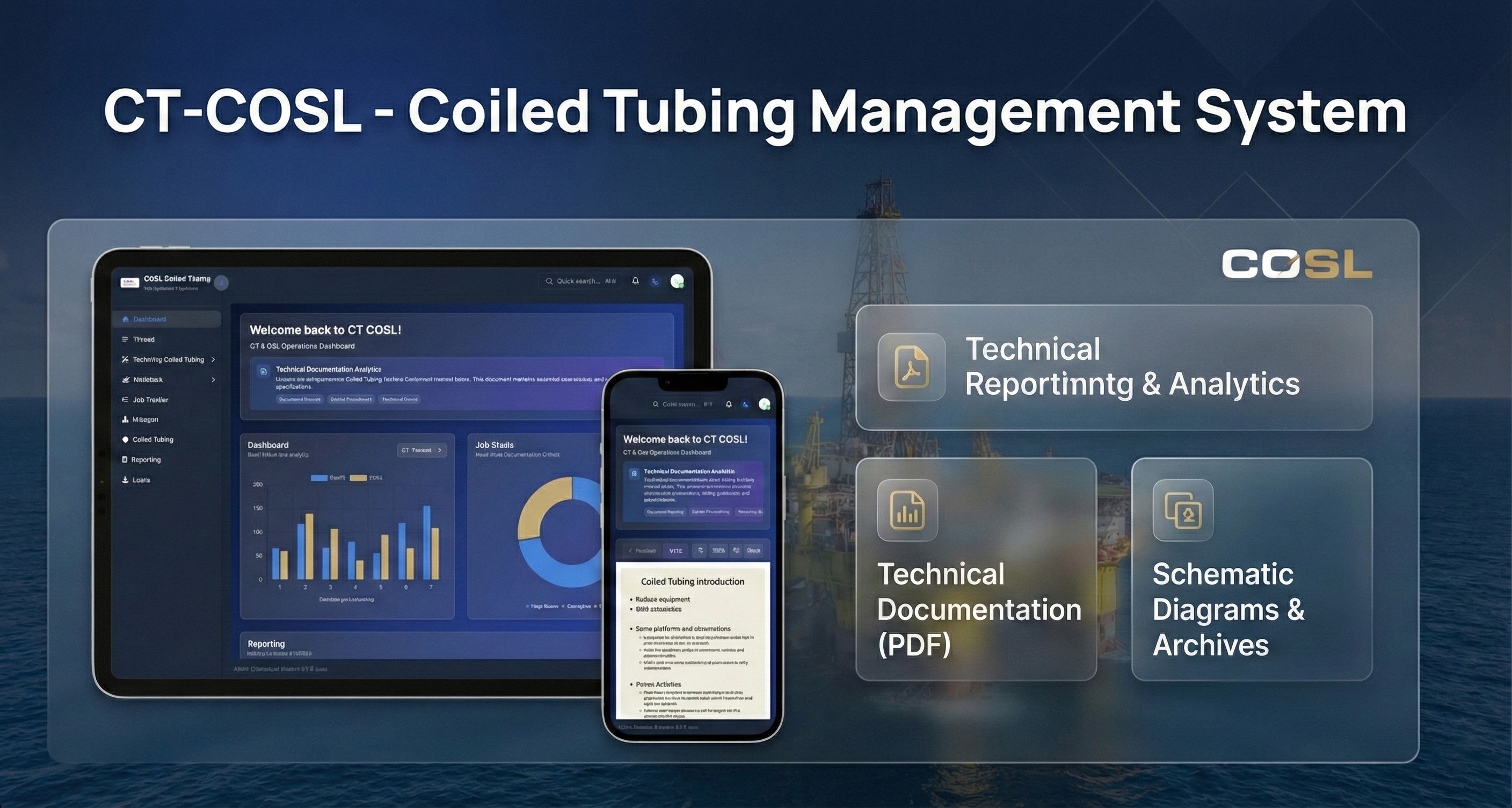
Overview
CT-COSL (COSL Coiled Tubing Management System) is a professional web-based admin dashboard built with Laravel 12 and Vue.js 3, specifically designed for managing coiled tubing operations in the oil & gas industry. The application provides comprehensive tools for inventory management, job tracking, documentation, reporting, and user administration.
This project serves COSL (China Oilfield Services Limited) operations, offering an integrated platform for managing toolstring configurations, wellstack assemblies, thread specifications, and operational documentation.
Table of Contents
Key Features
🔐 Authentication & Authorization
- Standard Laravel Authentication with secure session management
- Role & Permission Management (in development)
- Multi-factor Authentication (planned)
- Activity Logging for all user actions
- Secure password policies with encryption
📊 Dashboard Analytics
- Real-time Data Visualization with interactive charts (in development)
- Custom Reporting System for toolstring and wellstack configurations
- PDF Export Functionality for reports and documentation
- Operational Statistics and KPI tracking
- Quick Access to technical documentation
👥 User Management
- Complete CRUD Operations for user accounts
- Role Assignment with granular permissions (in development)
- Activity Logging for audit trails
- User Profile Management with photo upload
- Access Control for downloads and job tracker modifications
🔧 Toolstring Coiled Tubing Management
- Fishing Tools inventory and specifications
- Standard Tools catalog management
- Custom Tool Configurations
- Tool Type Management with hierarchical organization
- Quick Actions for rapid tool selection
🏭 Wellstack Management
- Injector Head-IH component tracking
- Quad BOP (Blowout Preventer) management
- Stripper Pack Off inventory
- Active/Inactive Status tracking
- Visual Component Display with technical drawings
📋 Thread Management
- Thread Inventory with specifications
- Thread Type Configuration (AMMT, PAC, REGULAR)
- Size Management with top and bottom connections
- Thread Compatibility tracking
- Update History with timestamps
📄 Document Management
- Technical Documentation Library
- PDF Viewer with pagination and zoom controls
- Document Categories organization
- Version Control for documents
- Search Functionality across documents
📈 Job Tracker
- Job Description Management with custom options
- Customer Tracking and assignment
- COSL Base operations management
- Well Information recording
- Company Representative tracking
- Dynamic Form Fields with option management
📊 Reporting System
- Toolstring Coiled Tubing Reports
- Wellstack Configuration Reports
- Custom Report Templates
- PDF Export with professional formatting
- Template Management for reusable reports
🎨 UI/UX Features
- Responsive Design for all devices
- Dark/Light Theme toggle
- Dynamic Layouts with collapsible sidebar
- Real-time Notifications (in development)
- Quick Search functionality (⌘K / Ctrl+K)
- Smooth Animations and transitions
- Professional Color Scheme (Navy Blue theme)
Technology Stack
Backend Technologies
Framework & Core:
- Laravel 12.x - Latest PHP framework with modern features
- PHP 8.2+ - Latest PHP version with improved performance
- MySQL 8.0+ / MariaDB - Relational database management
Key Laravel Packages:
- Laravel Sanctum - API authentication
- Laravel Breeze - Authentication scaffolding
- Spatie Laravel Permission (planned) - Role & permission management
- Laravel Debugbar - Development debugging
- Laravel IDE Helper - Enhanced IDE support
Frontend Technologies
Framework & Libraries:
- Vue.js 3 - Progressive JavaScript framework
- Vue Router 4 - Official router for Vue.js
- Pinia - State management for Vue
- Tailwind CSS 3 - Utility-first CSS framework
- Vite 5 - Next generation frontend tooling
UI Components:
- Custom Vue components
- Heroicons - Icon library
- Vue Transitions - Smooth animations
- Toast notifications
- Modal dialogs
Development Tools
Build Tools:
- Vite - Fast build tool and dev server
- PostCSS - CSS transformation
- Autoprefixer - CSS vendor prefixing
Code Quality:
- ESLint - JavaScript linting
- Prettier - Code formatting
- PHP CS Fixer - PHP code standards
- PHPStan - PHP static analysis (optional)
Version Control:
- Git
- GitHub
DevOps & Deployment
Local Development:
- MAMP - Mac development environment
- XAMPP - Cross-platform development stack
- LAMPP - Linux Apache MySQL PHP Python
- Laravel Sail - Docker development environment
- Artisan - Laravel command-line interface
Production Deployment:
- Apache / Nginx web server
- PHP-FPM - FastCGI Process Manager
- MySQL / MariaDB - Production database
- Redis - Caching and session storage (optional)
- Supervisor - Queue worker management (optional)
System Architecture
Application Architecture
The application follows MVC (Model-View-Controller) pattern with additional layers:
Backend Architecture (Laravel):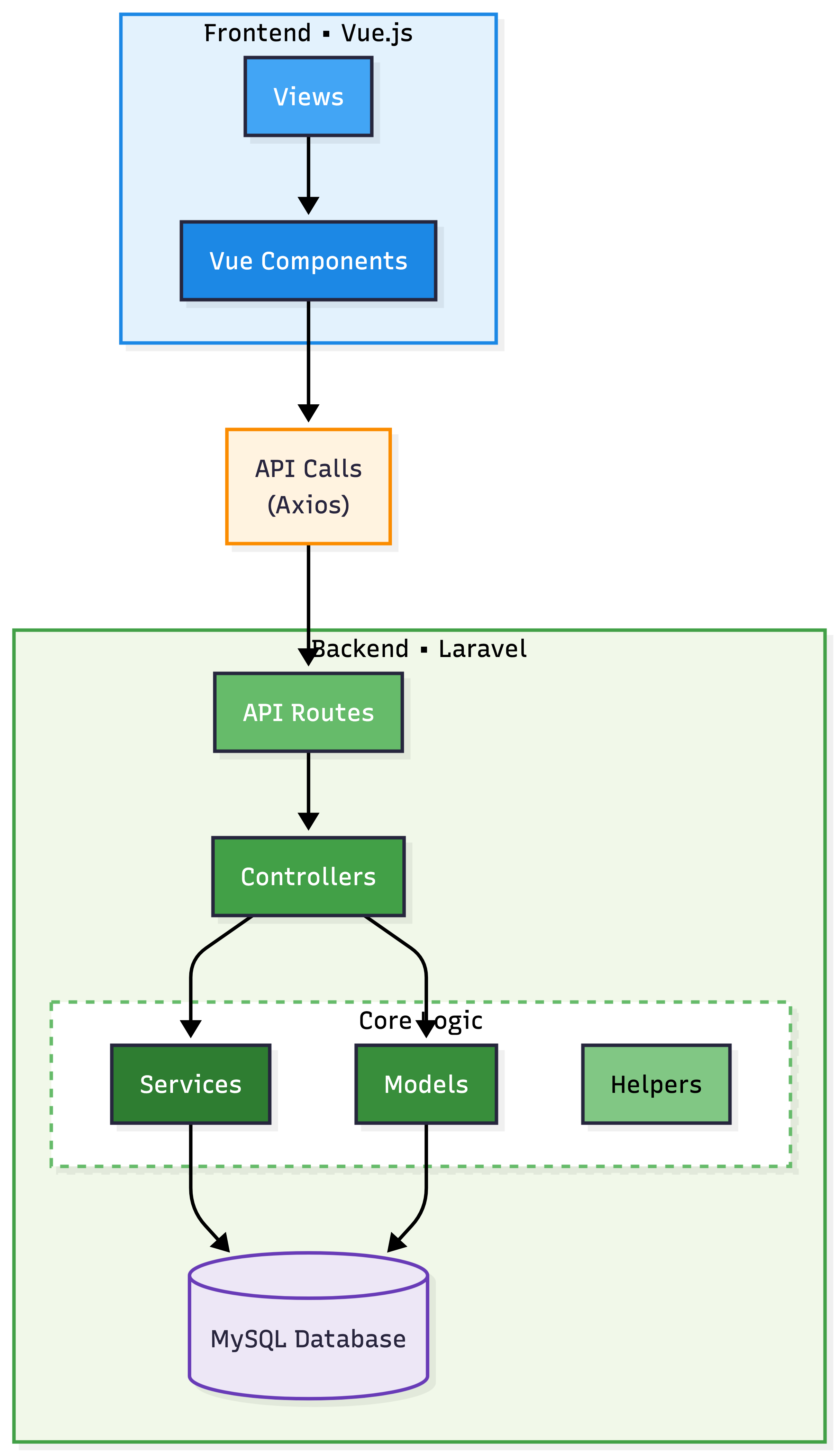 Backend Architecture (Laravel)
Frontend Architecture (Vue.js):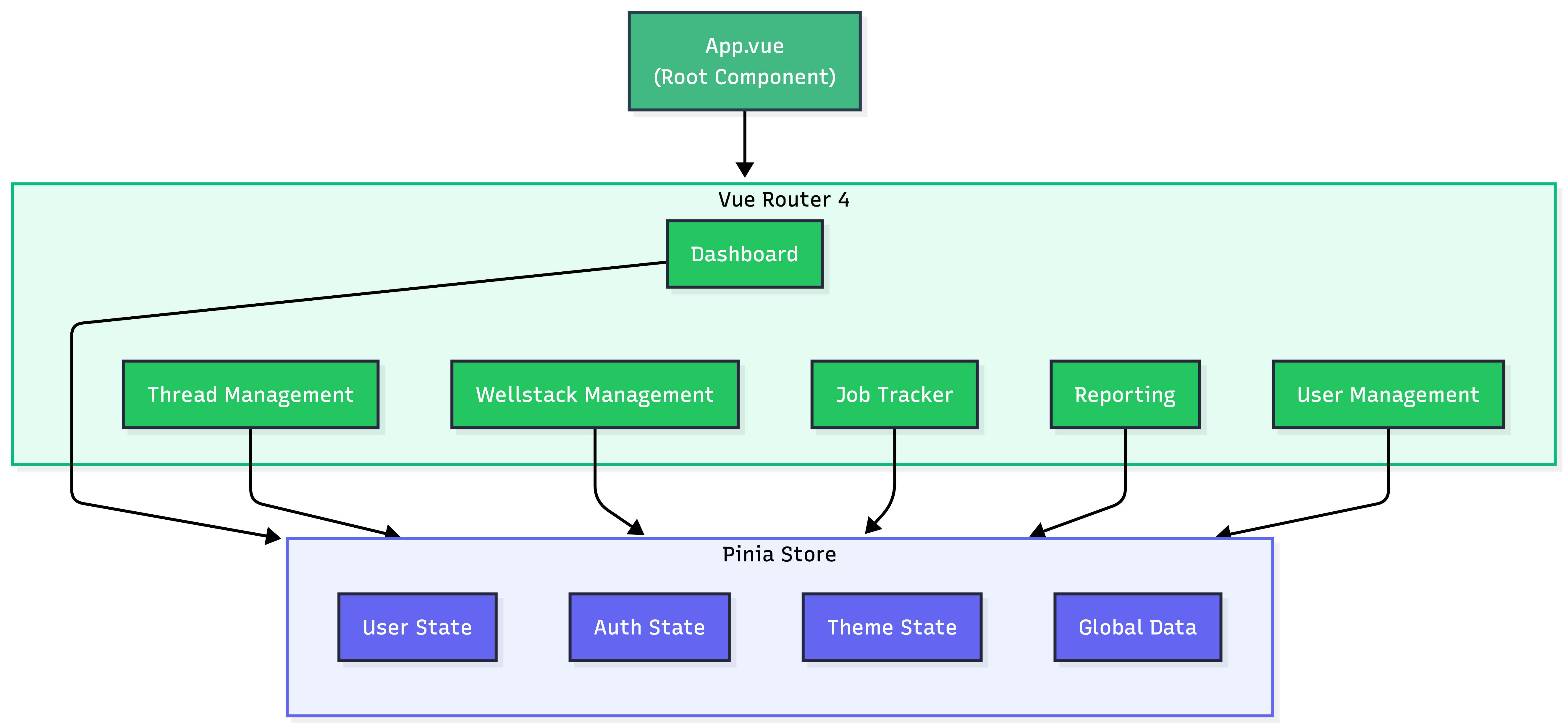 Frontend Architecture (Vue.js)
Data Flow
Request-Response Cycle:
- User Interaction → Vue Component
- Component Action → Pinia Store (State Management)
- API Call → Fetch API HTTP Request
- Laravel Route → Controller Method
- Business Logic → Service/Model Layer
- Database Query → MySQL Database
- Response → JSON Data
- State Update → Pinia Store
- UI Update → Vue Reactive Rendering
User Interface
1. Login Page
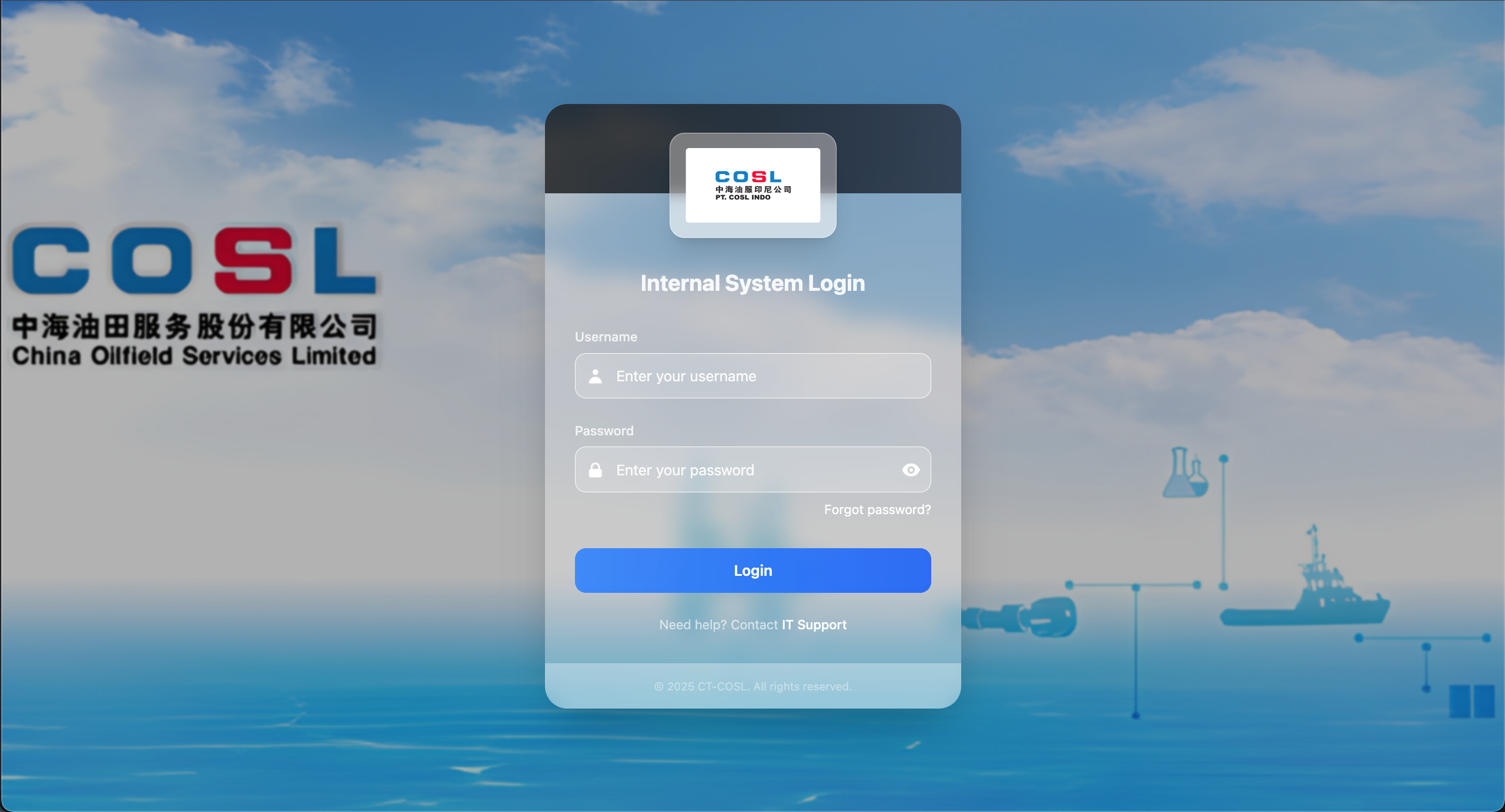
Clean Authentication Interface:
- COSL company branding
- Username and password fields
- Password visibility toggle
- "Forgot password?" link
- IT Support contact information
- Blurred oil rig background image
- Professional blue color scheme
Features:
- Secure authentication
- Session management
- Remember me functionality
- CSRF protection
- Rate limiting for security
2. Dashboard Home
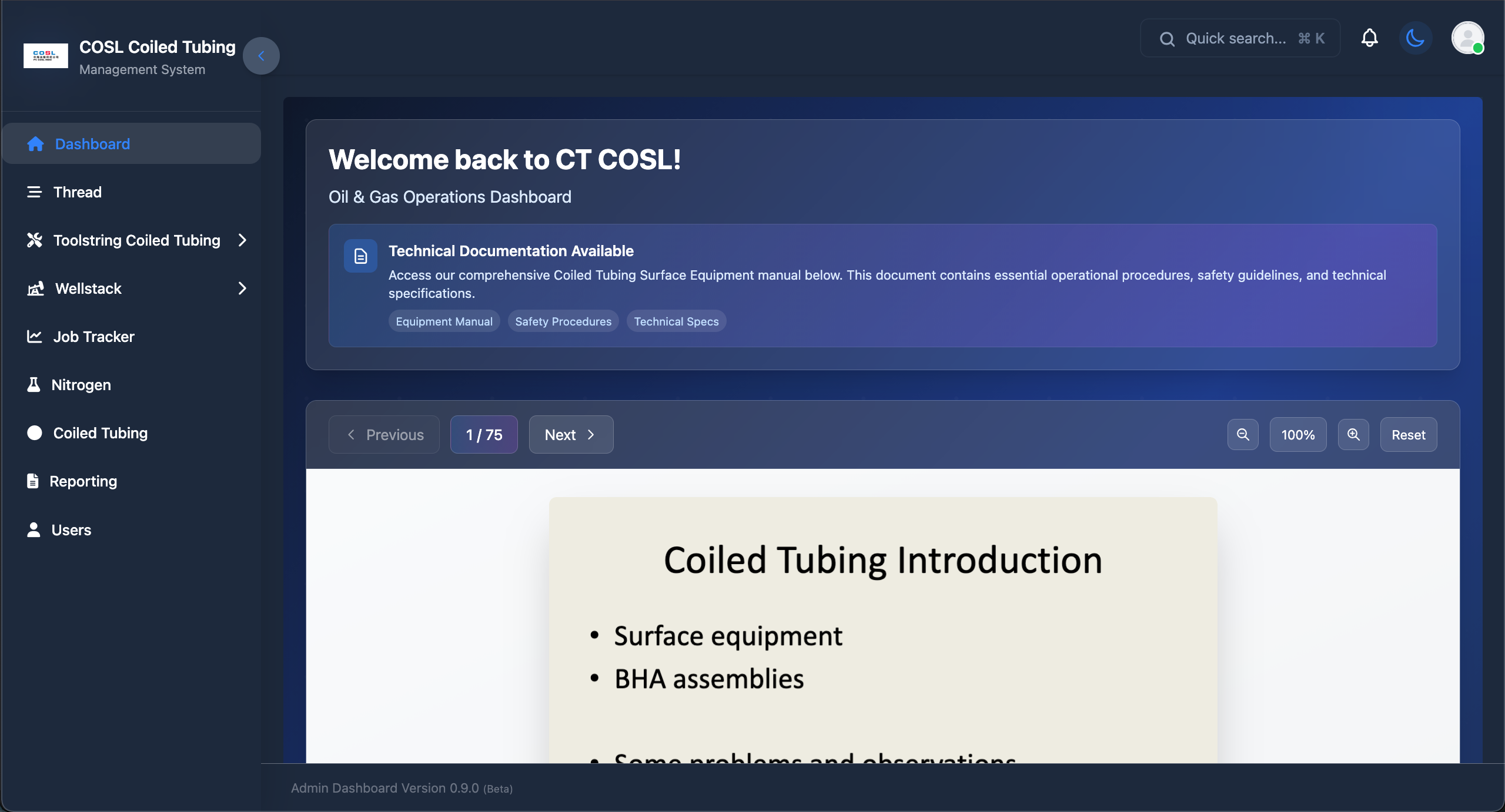
Welcome Screen with Quick Access:
Header Section:
- Application logo and name
- Quick search (⌘K shortcut)
- Notification bell icon
- Dark/Light theme toggle
- User profile avatar
Welcome Banner:
- "Welcome back to CT COSL!" greeting
- "Oil & Gas Operations Dashboard" subtitle
- Technical Documentation Available section
- Quick access buttons:
- Equipment Manual
- Safety Procedures
- Technical Specs
PDF Viewer:
- Integrated document viewer
- Page navigation (Previous/Next)
- Page counter (1/75)
- Zoom controls (100%)
- Reset view button
- Display: "Coiled Tubing Introduction" document
Sidebar Navigation:
- Dashboard (home icon)
- Thread (hamburger icon)
- Toolstring Coiled Tubing (wrench icon, expandable)
- Wellstack (layers icon, expandable)
- Job Tracker (chart icon)
- Nitrogen (flask icon)
- Coiled Tubing (circle icon)
- Reporting (document icon)
- Users (user icon)
Footer:
- Admin Dashboard Version 0.9.0 (Beta)
3. Thread Management
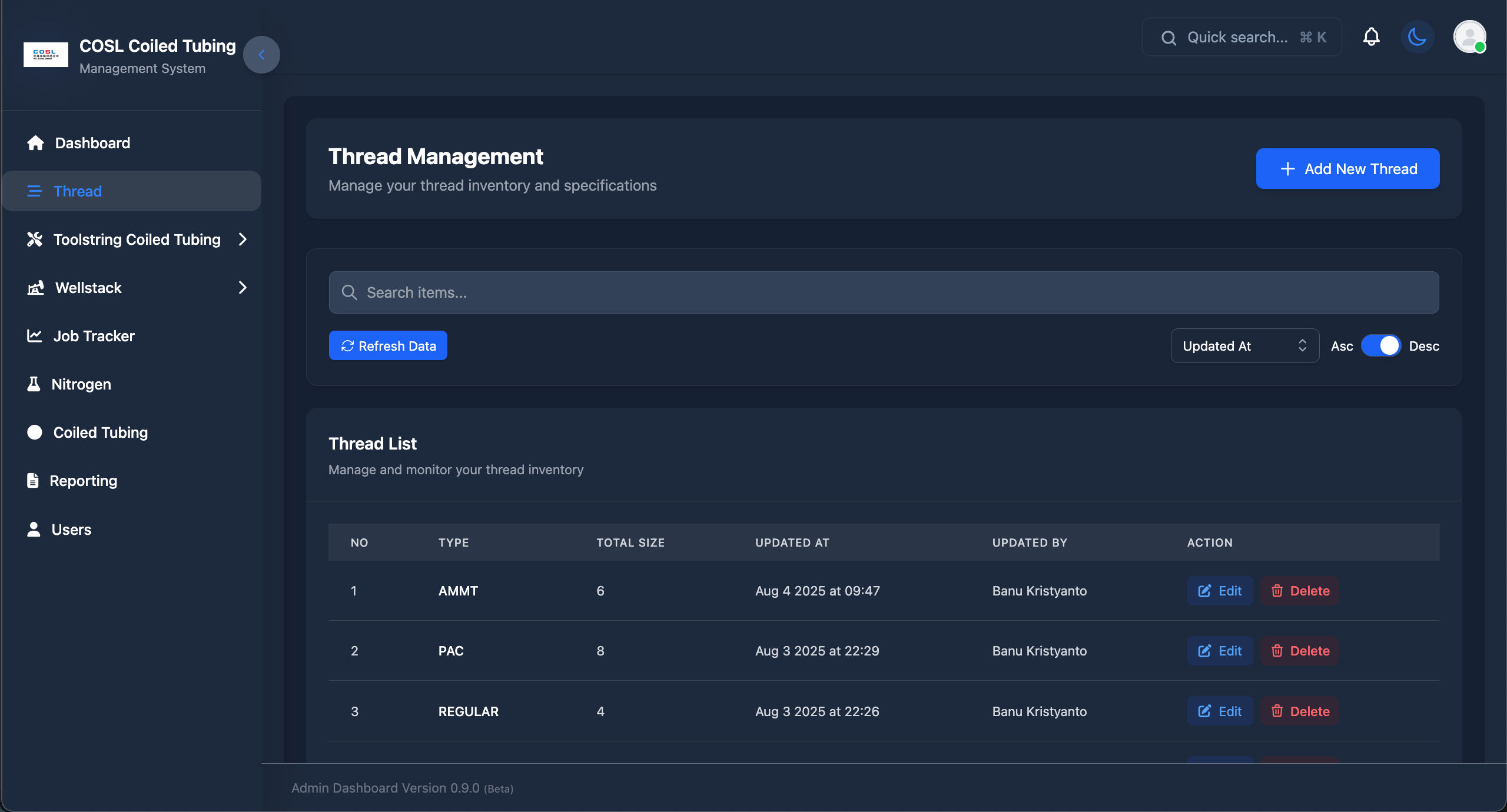
Thread Inventory Interface:
Page Header:
- "Thread Management" title
- "Manage your thread inventory and specifications" subtitle
- Blue "Add New Thread" button
Search and Filter:
- Search bar: "Search items..."
- "Refresh Data" button (blue)
- Sort by: "Updated At" dropdown
- Asc/Desc toggle switch
Thread List Table:
Columns:
- NO (Row number)
- TYPE (Thread type)
- TOTAL SIZE (Number of sizes)
- UPDATED AT (Timestamp)
- UPDATED BY (User name)
- ACTION (Edit/Delete buttons)
Sample Data:
- AMMT - 6 sizes - Aug 4 2025 at 09:47 - Banu Kristyanto
- PAC - 8 sizes - Aug 3 2025 at 22:29 - Banu Kristyanto
- REGULAR - 4 sizes - Aug 3 2025 at 22:26 - Banu Kristyanto
Features:
- Real-time data updates
- Inline editing
- Soft delete functionality
- Timestamp tracking
- User attribution
4. Edit Thread Dialog
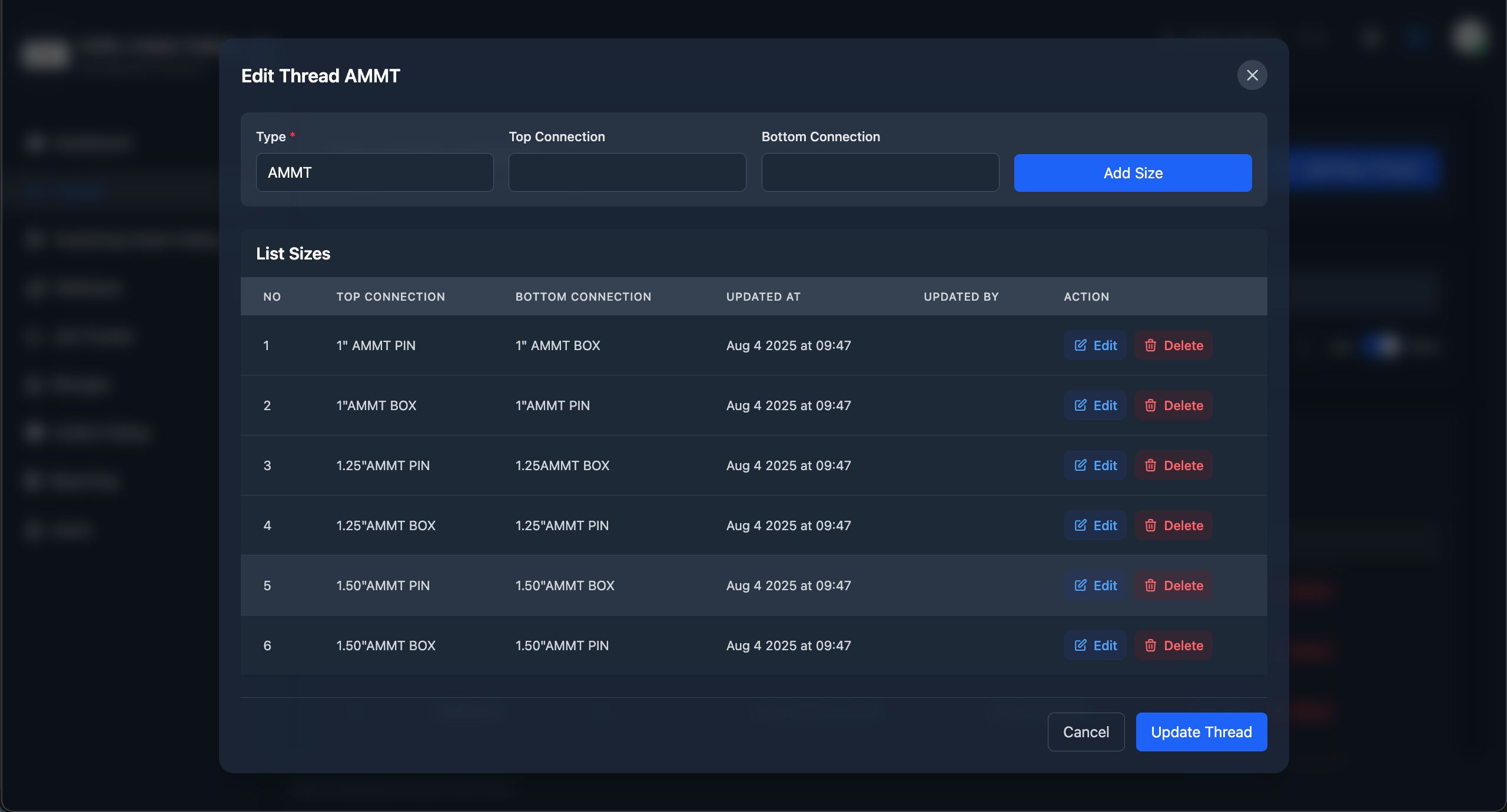
Thread Size Configuration Modal:
Modal Header:
- "Edit Thread AMMT" title
- Close button (X)
Input Section:
- Type field (pre-filled: "AMMT")
- Top Connection (dropdown)
- Bottom Connection (dropdown)
- Blue "Add Size" button
List Sizes Table:
Columns:
- NO
- TOP CONNECTION
- BOTTOM CONNECTION
- UPDATED AT
- UPDATED BY
- ACTION (Edit/Delete)
Sample Size Configurations:
- 1" AMMT PIN → 1" AMMT BOX
- 1"AMMT BOX → 1"AMMT PIN
- 1.25"AMMT PIN → 1.25AMMT BOX
- 1.25"AMMT BOX → 1.25"AMMT PIN
- 1.50"AMMT PIN → 1.50"AMMT BOX
- 1.50"AMMT BOX → 1.50"AMMT PIN
Action Buttons:
- Cancel (secondary)
- Update Thread (primary blue)
5. Toolstring Navigation
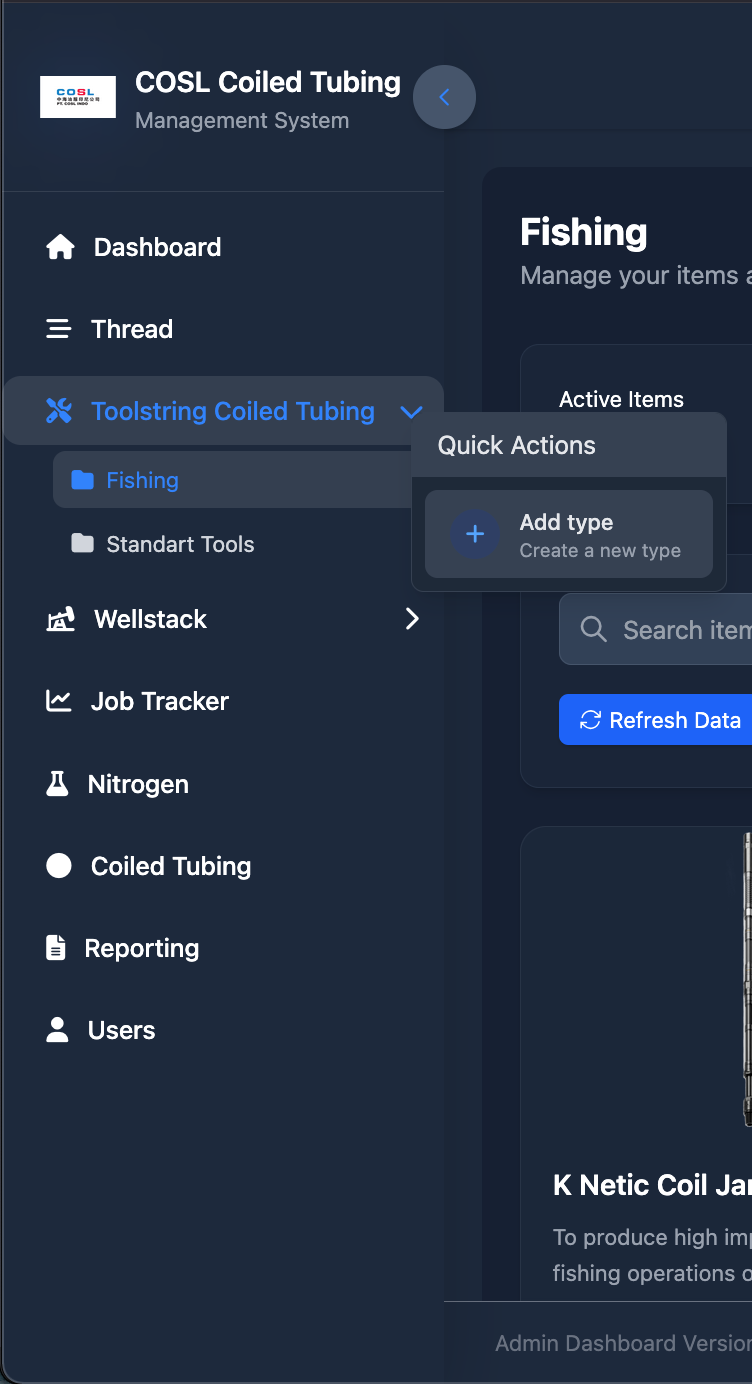
Hierarchical Navigation:
Expanded Toolstring Coiled Tubing Menu:
- Fishing (folder icon, highlighted in blue)
- Standart Tools (folder icon)
Quick Actions Panel:
- "Add type" button
- "Create a new type" description
Right Side Content:
- "Fishing" heading
- "Manage your items and..." subtitle
- "Active Items" section
- Search bar
- "Refresh Data" button
Features:
- Collapsible menu structure
- Visual hierarchy with icons
- Quick action shortcuts
- Context-based content display
6. Wellstack - Injector Head
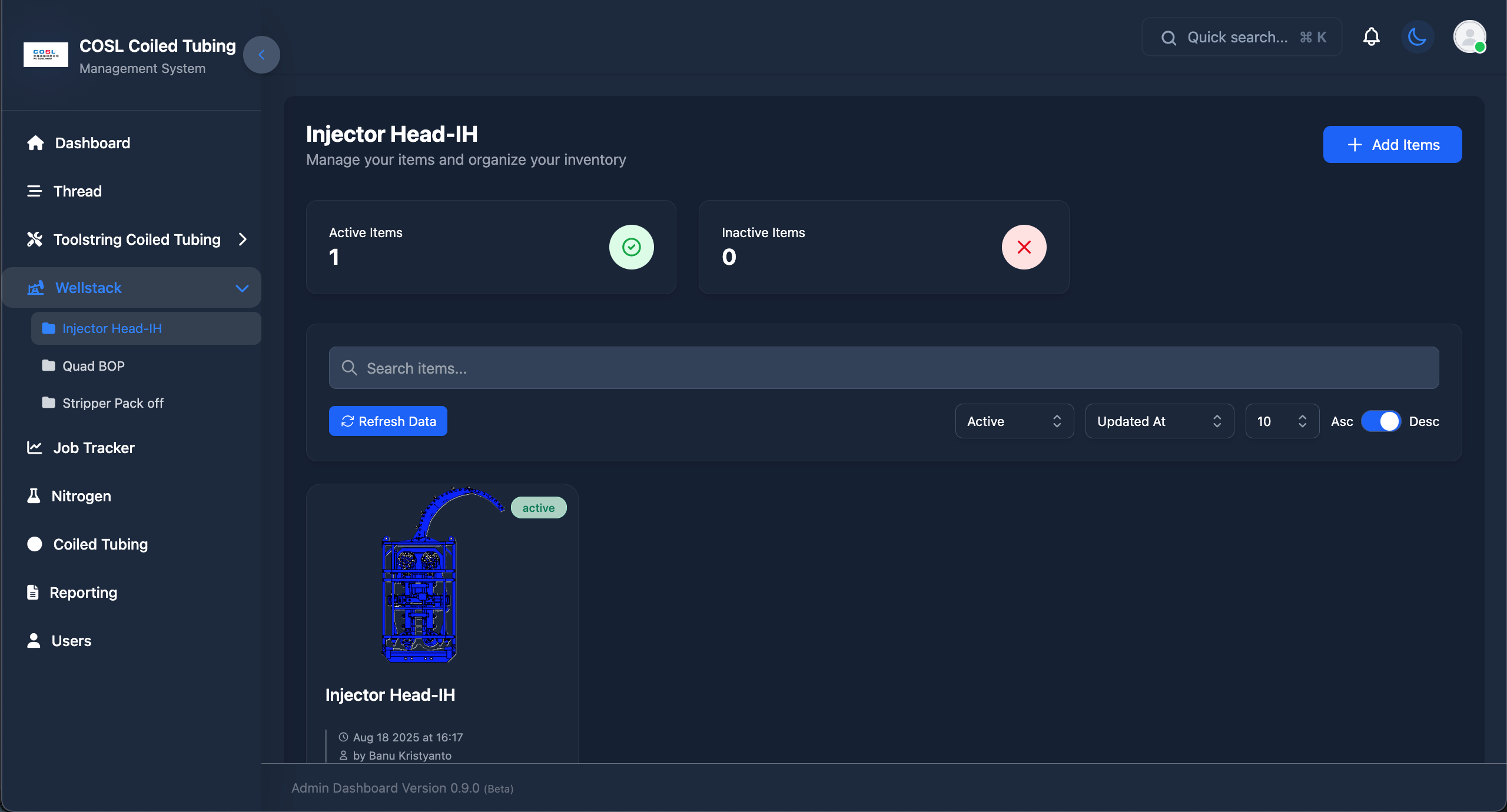
Component Inventory Interface:
Page Header:
- "Injector Head-IH" title
- "Manage your items and organize your inventory"
- Blue "Add Items" button
Statistics Cards:
- Active Items: 1 (green check icon)
- Inactive Items: 0 (red X icon)
Search and Filters:
- Search bar: "Search items..."
- "Refresh Data" button
- Filter dropdowns:
- Active (status filter)
- Updated At (sort by)
- 10 (items per page)
- Asc/Desc toggle
Item Display:
- Technical drawing/blueprint of Injector Head
- Status badge: "active" (green)
- Item name: "Injector Head-IH"
- Timestamp: "Aug 18 2025 at 16:17"
- User: "by Banu Kristyanto"
Sidebar Submenu:
- Injector Head-IH (highlighted)
- Quad BOP
- Stripper Pack off
7. Job Tracker Edit
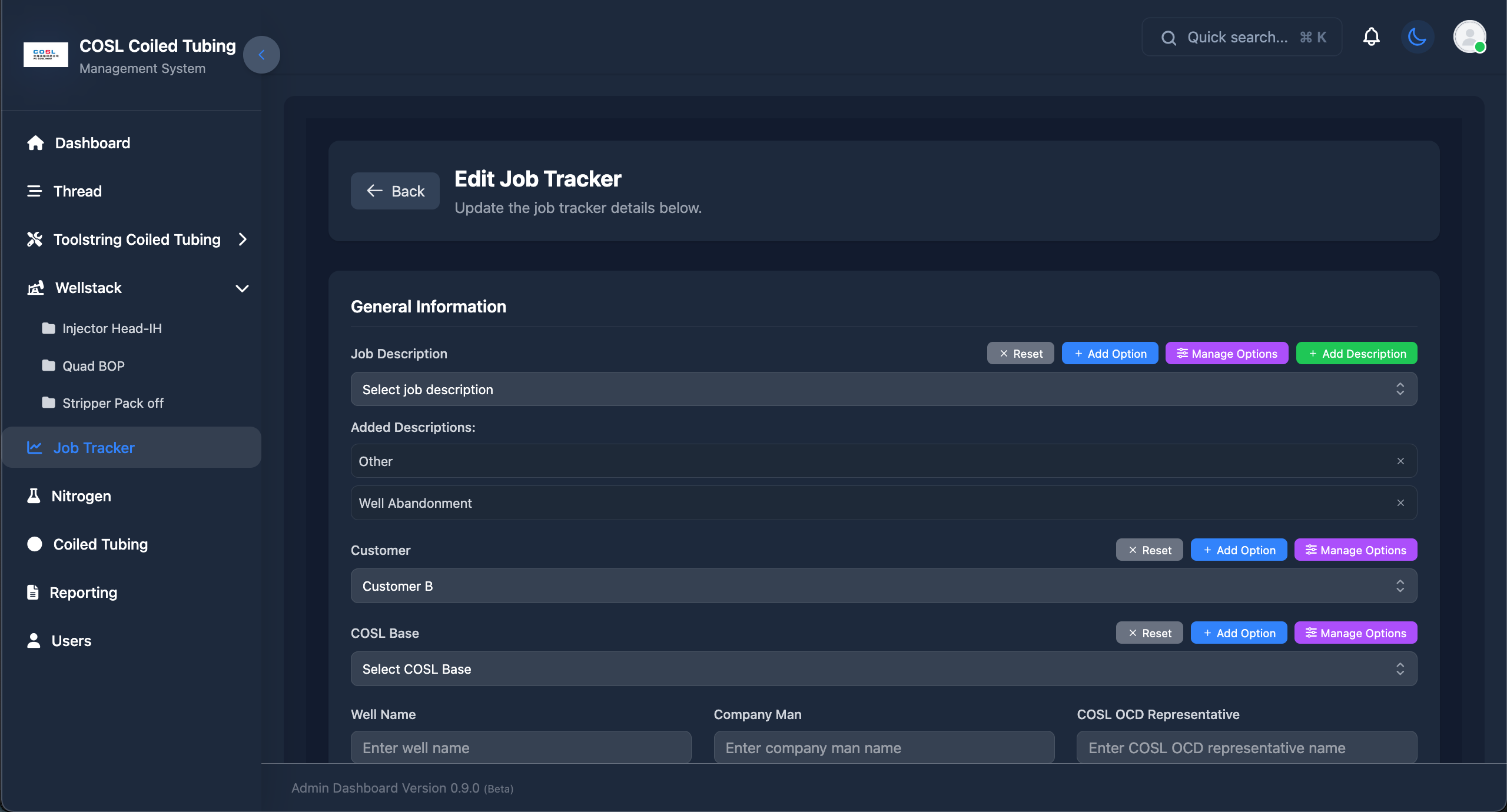
Job Information Management:
Page Header:
- Back button
- "Edit Job Tracker" title
- "Update the job tracker details below."
General Information Section:
Job Description:
- Dropdown: "Select job description"
- "Added Descriptions:" label
- Other (with X to remove)
- Well Abandonment (with X to remove)
- Action buttons:
- Reset
- Add Option (blue)
- Manage Options (purple)
- Add Description (green)
Customer:
- Dropdown: "Customer B" (selected)
- Action buttons:
- Reset
- Add Option (blue)
- Manage Options (purple)
COSL Base:
- Dropdown: "Select COSL Base"
- Action buttons:
- Reset
- Add Option (blue)
- Manage Options (purple)
Text Input Fields:
- Well Name
- Company Man
- COSL OCD Representative
8. Document Management
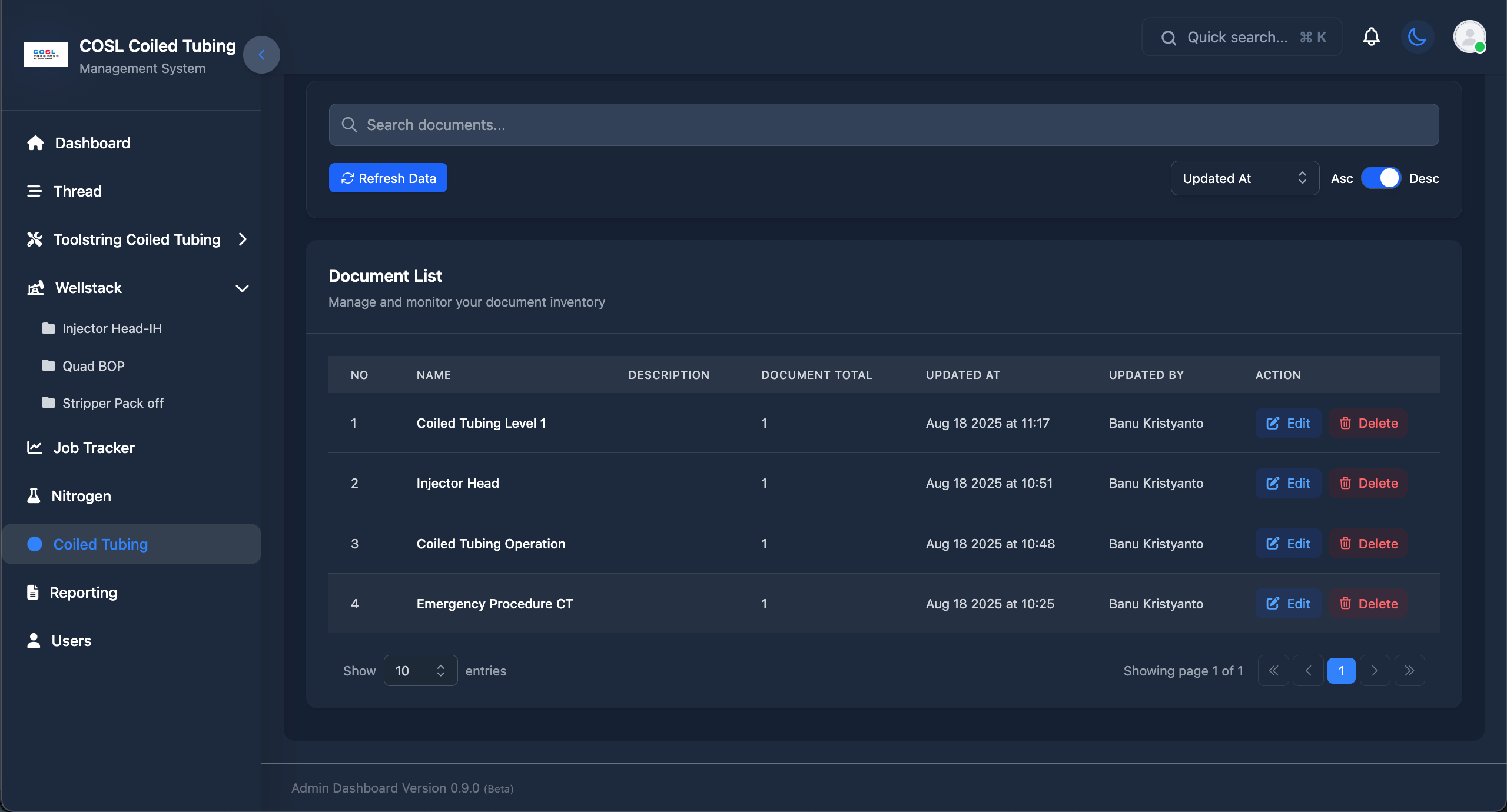
Technical Documentation Library:
Search Bar:
- "Search documents..." input
Controls:
- "Refresh Data" button (blue)
- Sort by: "Updated At" dropdown
- Asc/Desc toggle
Document List:
Section Header:
- "Document List"
- "Manage and monitor your document inventory"
Table Columns:
- NO
- NAME
- DESCRIPTION
- DOCUMENT TOTAL
- UPDATED AT
- UPDATED BY
- ACTION (Edit/Delete)
Sample Documents:
- Coiled Tubing Level 1 - 1 doc - Aug 18 2025 at 11:17
- Injector Head - 1 doc - Aug 18 2025 at 10:51
- Coiled Tubing Operation - 1 doc - Aug 18 2025 at 10:48
- Emergency Procedure CT - 1 doc - Aug 18 2025 at 10:25
All updated by: Banu Kristyanto
Pagination:
- Show 10 entries
- Showing page 1 of 1
- Navigation arrows (<<, <, 1, >, >>)
9. Reporting - Toolstring
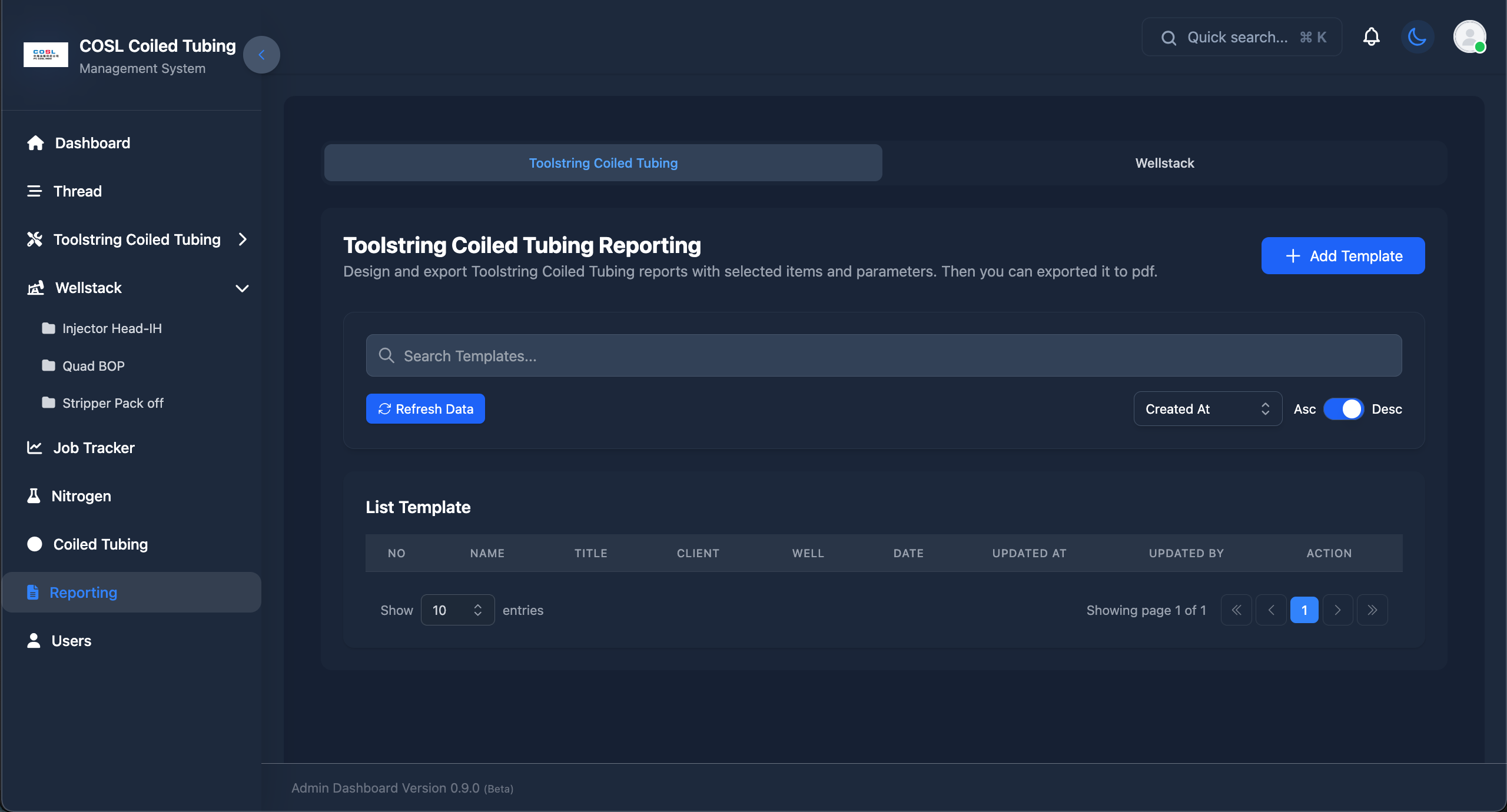
Report Template Management:
Breadcrumb Navigation:
- Toolstring Coiled Tubing
- Wellstack (available)
Page Header:
- "Toolstring Coiled Tubing Reporting"
- Description: "Design and export Toolstring Coiled Tubing reports with selected items and parameters. Then you can exported it to pdf."
- Blue "Add Template" button
Search Bar:
- "Search Templates..." input
Controls:
- "Refresh Data" button (blue)
- Sort by: "Created At" dropdown
- Asc/Desc toggle
List Template Section:
Table Columns:
- NO
- NAME
- TITLE
- CLIENT
- WELL
- DATE
- UPDATED AT
- UPDATED BY
- ACTION
Pagination:
- Show 10 entries
- Showing page 1 of 1
- Navigation controls
Status:
- Empty state (no templates yet)
10. User Management
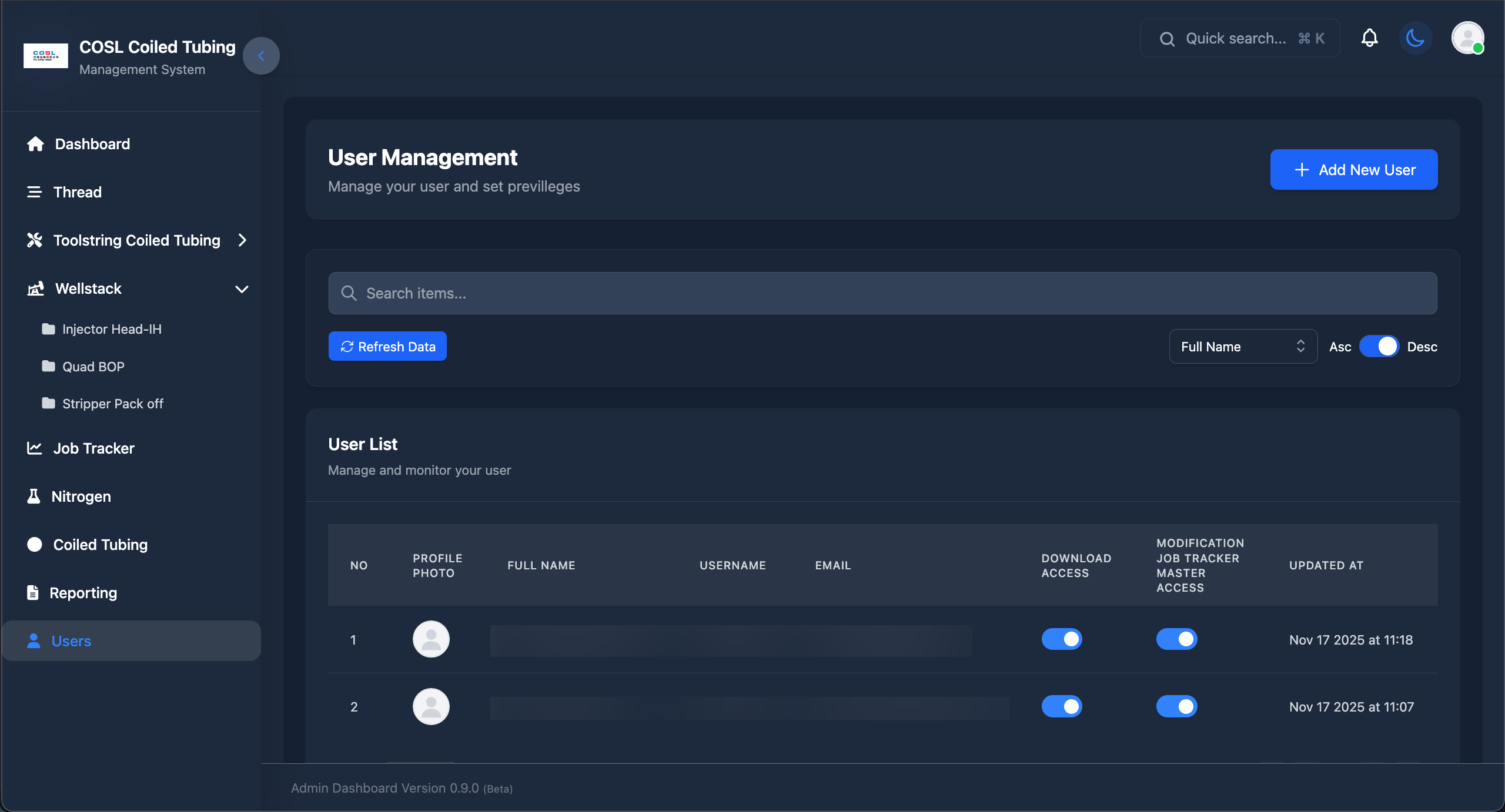
User Administration Interface:
Page Header:
- "User Management" title
- "Manage your user and set previlleges"
- Blue "Add New User" button
Search and Controls:
- Search bar: "Search items..."
- "Refresh Data" button (blue)
- Sort by: "Full Name" dropdown
- Asc/Desc toggle
User List:
Section Header:
- "User List"
- "Manage and monitor your user"
Table Columns:
- NO
- PROFILE PHOTO (avatar)
- FULL NAME
- USERNAME
- DOWNLOAD ACCESS (toggle)
- MODIFICATION JOB TRACKER MASTER ACCESS (toggle)
- UPDATED AT
Module Descriptions
1. Dashboard Module
Purpose: Central hub for quick access to all system features and documentation
Key Features:
- Welcome banner with greeting
- Technical documentation viewer with PDF integration
- Quick access to manuals and procedures
- Navigation shortcuts
- System version information
2. Thread Management Module
Purpose: Manage thread inventory, types, and size configurations
Key Features:
- Thread type management (AMMT, PAC, REGULAR)
- Size configuration with top/bottom connections
- Complete CRUD operations
- Search and filtering
- Update history tracking
Business Logic:
- Thread compatibility validation
- Size range checking
- Connection type validation
3. Toolstring Coiled Tubing Module
Purpose: Manage toolstring inventory with hierarchical organization
Key Features:
- Two main categories: Fishing and Standard Tools
- Item type management
- Custom tool configurations
- Visual tool representation
- Active/Inactive status tracking
Submodules:
- Fishing Tools: Specialized fishing equipment
- Standard Tools: Common coiled tubing tools
4. Wellstack Module
Purpose: Manage wellstack component inventory and configurations
Key Features:
- Three component types:
- Injector Head-IH
- Quad BOP (Blowout Preventer)
- Stripper Pack Off
- Visual component display with technical drawings
- Active/Inactive status management
- Component specifications
- Image upload functionality
5. Job Tracker Module
Purpose: Track and manage coiled tubing job information
Key Features:
- Dynamic job description management
- Customer assignment and tracking
- COSL base operations management
- Well information recording
- Company representative tracking
- Customizable form fields
- Option management for dropdowns
Business Logic:
- Dynamic form field generation
- Option management for select fields
- Job history tracking
- Status workflow management
6. Nitrogen Module
Purpose: Manage nitrogen equipment and operations (placeholder for future development)
Status: Under development
7. Coiled Tubing Module
Purpose: Main coiled tubing operations and documentation
Key Features:
- Technical documentation library
- PDF document management
- Document categorization
- Version control
- Search functionality
8. Reporting Module
Purpose: Generate and manage custom reports for operations
Key Features:
- Two report types:
- Toolstring Coiled Tubing Reports
- Wellstack Configuration Reports
- Template management
- PDF export functionality
- Custom report parameters
- Report history
Export Features:
- Professional PDF formatting
- Company branding
- Custom headers/footers
- Data visualization
9. User Management Module
Purpose: Administer user accounts and access control
Key Features:
- Complete user CRUD operations
- Profile photo upload
- Access control toggles:
- Download Access
- Job Tracker Master Modification Access
- User search and filtering
- Activity tracking
- Bulk operations (planned)
Security Features:
- Password hashing (bcrypt)
- Email verification
- Password reset functionality
- Account lockout after failed attempts
- Session management
Authentication & Authorization
Authentication System
Based on Laravel Breeze with custom modifications:
Authentication Features:
- Email/Username login
- Password hashing (bcrypt)
- Session-based authentication
- Remember me functionality
- Password reset via email
- Email verification (optional)
Authorization System
Permission-Based Access Control:
Access Levels:
- Download Access
- Control access to document downloads
- PDF export functionality
- Report generation
- Job Tracker Master Access
- Modify job descriptions
- Manage customers
- Manage COSL bases
- Update job tracker master data
Future Enhancements
Planned Features
Phase 1 - Q1 2025:
- Complete role & permission system (Spatie Laravel Permission)
- Multi-factor authentication (2FA)
- Real-time notifications with Laravel Echo
- Advanced search with filters
- Bulk operations for all modules
- Activity timeline for all entities
Phase 2 - Q2 2025:
- Mobile responsive improvements
- PWA (Progressive Web App) support
- Offline mode for critical features
- Advanced analytics dashboard
- Custom report builder with drag-drop
- Email notifications for job updates
- SMS notifications (optional)
Phase 3 - Q3 2025:
- Multi-language support (English, Chinese, Indonesian)
- API versioning
- Public API with OAuth2 authentication
- Third-party integrations
- Automated backup system
- Audit log viewer
- Advanced user activity tracking
Phase 4 - Q4 2025:
- Mobile application (React Native)
- QR code generation for equipment
- Barcode scanning for inventory
- Maintenance scheduling system
- Equipment lifecycle tracking
- Predictive maintenance alerts
- Integration with ERP systems
Technology Upgrades
Planned Upgrades:
- Laravel 13 migration (when released)
- Vue.js 4 migration (when stable)
- TypeScript adoption for better type safety
- GraphQL API alternative
- WebSocket for real-time features
- Redis for improved caching
- Elasticsearch for advanced search
- Docker containerization for easier deployment
Contact & Support
Developer:
Fauzan Nur Hidayat
For Questions:
Contact me
Acknowledgments
Built With:
- Laravel - The PHP Framework for Web Artisans
- Vue.js - The Progressive JavaScript Framework
- Tailwind CSS - A utility-first CSS framework
- Vite - Next Generation Frontend Tooling
Special Thanks:
- COSL (China Oilfield Services Limited) - For project opportunity
- Laravel Community - For excellent documentation and packages
- Vue.js Community - For components and inspiration
- All contributors and testers
Last Updated: January 2025
Documentation Version: 1.0.0
Application Version: 0.9.0 (Beta)